


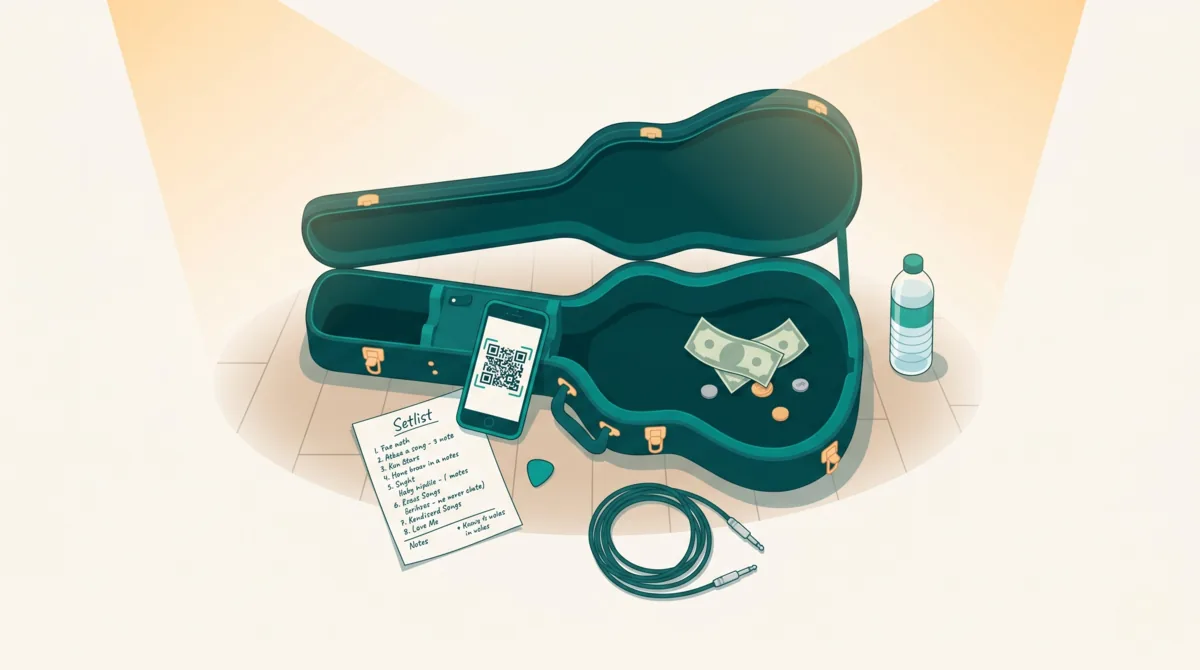
You’re halfway through a set. Someone at the back table wants to leave a tip, but they don’t have cash. There’s a QR code beside the stage. They scan it.
What happens next matters.
Can they see who they’re supporting? Can they pay without downloading something or creating an account? Can they finish before their attention returns to the music?
The best digital tip jar for a live musician makes that moment easy. It can also help fans find your next show, take part in the set and stay connected after the night ends. Here’s what to compare before choosing one.
This guide is published by Tiplor, a platform built for live entertainment.
A quick comparison for your next gig
A payment link may be all you need if you only want to collect money. If you also want fans to find your next show or request a song, compare what comes with the tipping page. Reusable QR codes and direct payments are useful basics; the live-music tools around them are where Tiplor adds more.
| What to compare | With Tiplor |
|---|---|
| Fan experienceKeep the path short. | Mobile web tipping, with no required fan app or account. |
| What you keepCompare the net amount. | 15% per tip, including standard processing. An ordinary $10 tip leaves $8.50 after that fee. |
| Bank payoutsKnow where the money goes. | No monthly Tiplor payout run. Tips normally flow to your connected Stripe account as they’re processed; bank deposits follow Stripe’s payout schedule. |
| Reusable QRTake it between venues. | A permanent artist QR and link for your signs and social profiles. |
| Country and currencyCheck before printing. | CAD, USD, GBP, EUR and AUD. Availability and bank payouts depend on your country and connected Stripe account. |
| Calendar and discoveryHelp fans find the next show. | Upcoming gigs on your artist profile, calendar subscriptions and public gig discovery. |
| Song RequestsKeep control of your set. | Optional artist Song Requests from the songs you make available. You choose when requests are open and what gets played. |
| ReportingSee how fans find and support you. | Review tips, QR scans and profile views. |
The fee example assumes a tip paid directly to one artist, with no venue split or currency conversion. Bank charges may apply; see the payment and payout terms.
Create your free artist profile
1. Start with the fan’s experience
Try the tipping page yourself before putting its QR code on a sign. Open it on a phone where you aren’t already signed in.
Look for a short, clear path: identify the performer, choose an amount, pay, receive confirmation.
An app download, mandatory account or confusing payment screen adds another step between someone wanting to support you and following through. Check which payment methods are available, including cards and mobile wallets, and whether they work for your audience.
At a gig, your tipping page has to make sense without you standing beside someone explaining it.
With Tiplor: fans scan your QR code or open your link and tip through a mobile web page. They can use a card or an available mobile wallet without downloading an app or creating a fan account. Your name and photo make it clear who they’re supporting.
2. Compare what you keep from an ordinary tip
“Free to sign up” tells you about setup. It doesn’t tell you what happens when someone tips.
Before choosing a platform, check:
- The platform’s fee.
- Whether payment processing is included or deducted separately.
- Any subscription, withdrawal or currency-conversion costs.
- Whether the fan pays anything beyond the amount they selected.
Compare the amount you would receive from a $5, $10 and $20 tip. A fixed charge makes a bigger difference on a small payment, so the examples should reflect the amounts your audience is likely to give.
With Tiplor: the fee is 15% of each successful tip, including Stripe’s standard processing fees. Tiplor covers those processing costs within its fee, so you don’t subtract a second card-processing charge. A $10 CAD tip paid directly to one artist leaves $8.50 CAD after the fee; the same calculation applies to a $10 USD tip. A venue split or currency conversion can change what reaches your bank. Read the payment and payout terms.
3. Understand when the money reaches your bank
A successful tip and a bank deposit are two different events.
Look for a clear explanation of where payments arrive, when they become available and how bank payouts work. Check whether there is a withdrawal minimum or anything you need to complete before receiving money.
With Tiplor: no waiting for a monthly payout. Once your Stripe account is connected and approved, tips normally flow to your Stripe account as payments are processed. Tiplor doesn’t collect them for a monthly payout run. Stripe then deposits the money into your verified bank account according to that account’s payout schedule. Bank arrival also depends on your bank; check your Stripe account for the expected payout date. Account verification and payment reviews can affect timing.
Complete your payout setup before the show. It’s easier to resolve a missing detail during soundcheck than after a busy weekend.
4. Choose a QR code that can follow you
You might play a pub on Friday, a market on Saturday and a private event the following week. Your audience should be able to find the same artist each time.
Check whether the platform gives you a reusable artist link and QR code. Find out whether you can download the code for your own signs and use the link in your social profiles.
With Tiplor: your permanent artist QR code follows you between venues. Print it once for the merch table, keep it with your instrument case and use your artist link in social bios. You keep the same way for fans to find you as the gigs change.
Ask what sits behind that code, too. A way to send money is useful; an artist profile with upcoming gigs gives someone a reason to come back.
Keep the physical tip jar, too. Give people an easy way to support you with whichever payment method they have.
5. Check country and currency support early
A platform may look right until you reach payout setup.
Confirm that it supports your country, your bank and the currency you expect to receive. If you regularly perform across borders, check what happens when a fan pays in another currency.
With Tiplor: supported currencies include Canadian dollars (CAD), US dollars (USD), British pounds (GBP), euros (EUR) and Australian dollars (AUD). Artists in Canada and the United States, the UK, Australia and several European countries already use Tiplor. Availability and bank payouts depend on your country and Stripe account. Check with Tiplor before printing signs if your country or currency isn’t listed, or if you plan to perform across borders.
Check the currency shown at checkout as well as the currency your bank receives. A cross-border show can involve conversion; the amount a fan sees and your bank deposit may use different currencies.
6. Look beyond a one-off payment
A successful tip is a good start. Consider what the platform can do for the rest of the night—and for the next time you play. A fan might discover your gig, support you at the show and use your profile to find the next one.
Calendar and discovery: help fans find your next gig
Add upcoming shows to your artist profile so a fan who enjoys tonight’s set can find the next one. Shows can also appear in Tiplor’s public gig discovery, helping people find live music to go and see.
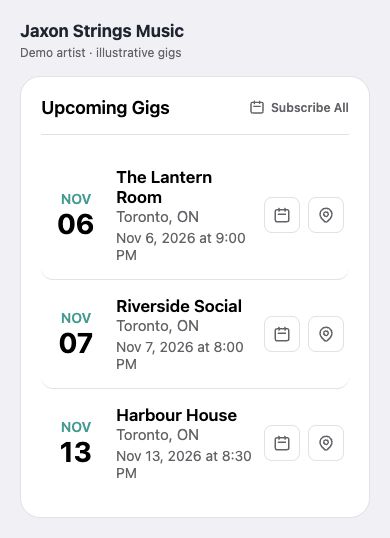
Fans can subscribe to your gig calendar, add a show to their own calendar and get directions to the venue. Your tipping link gives them a way to plan another night out.
Give tonight’s audience a next show to find
Follow the calendar. Fans can subscribe to the artist’s upcoming gigs from the public profile.
Plan a night out. Each listed gig gives fans the date and venue, with calendar and directions controls.
Product UI shown with fictional demo artist Jaxon Strings Music. Artist, venues and gigs are illustrative.
Enlarge the gig-calendar screenshot (opens in a new tab)Song Requests: invite the audience into your set
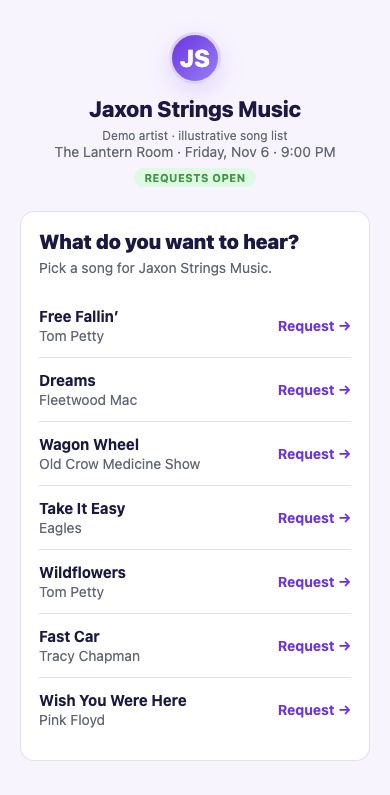
Fans choose from the songs you make available while you keep control of the set. Artist Song Requests is optional: you complete setup and choose when requests are open. For paid requests, you decide what gets played.
Invite requests. Keep control of the set.
You choose when it’s open. Artist Song Requests is an opt-in feature, available to fans when the artist has completed setup and opened requests.
Fans choose from your songs. Give the room a request list, then use your Stage screen to Accept, Skip and mark songs Played.
Product UI shown with fictional demo artist Jaxon Strings Music and an illustrative song list. Availability varies by artist and show.
Enlarge the Song Requests screenshot (opens in a new tab)For paid Song Requests, fans only pay for requests that get played. Requests made more than 24 hours before a show are charged upfront and refunded if skipped or left unplayed. Within 24 hours or during the show, payment is authorised and captured when you mark the song Played; otherwise the authorisation is released. Read the artist Song Requests guide for the details.
Reporting: see how fans find and support you
Review tips, QR scans and profile views so you can see how people are finding and supporting you. After a gig, check the activity alongside the tips received to understand how your audience used your Tiplor page.
Reporting gives you a record to review as you decide how to present your QR code and mention tipping at future shows.
You don’t need every feature. Choose the tools that fit your shows, from simple tipping to running a gig fundraiser. Fundraising tools give a benefit night a place to collect support and show progress toward its goal.
Before you print the sign
Run through the experience once from the audience’s side:
- Scan the QR code.
- Check that the correct artist is clearly identified.
- Review the available payment methods and displayed charges.
- Confirm that your artist account is ready to receive payouts.
- Test the printed code from the distance a fan will use it.
Then put the sign somewhere visible and give it one natural mention during the set:
“If you’re enjoying the music, there’s a QR code by the stage if you’d like to leave a tip. Thanks for supporting live music.”
The right digital tip jar should be easy for your audience to use and clear for you to manage. Set it up, check the details, and get back to the music.
If you want a tip jar that follows you between gigs and gives fans a way to find your next show, start with your artist profile.
Create your free artist profile
Already set up? Make a QR code tip sign for your next gig.