


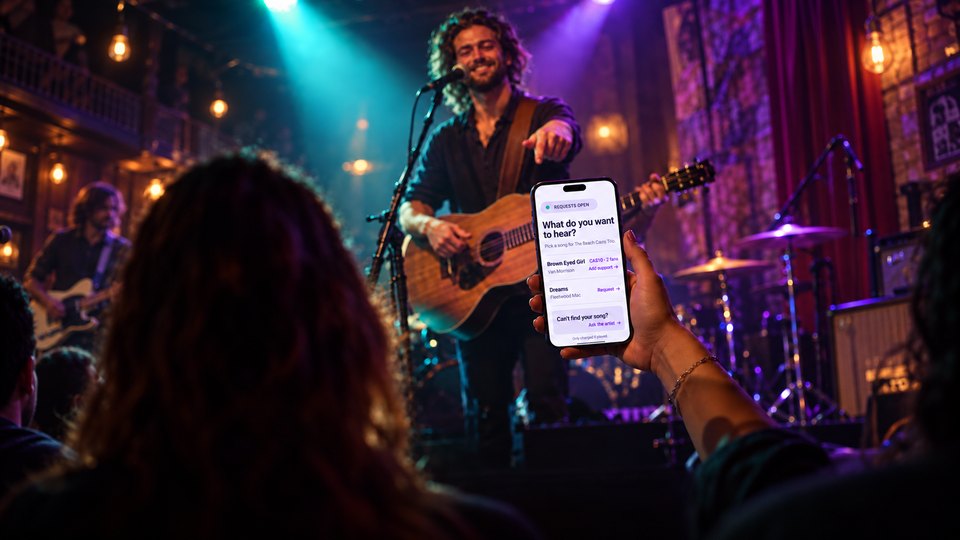
Your fans are already making requests. They call one out from the back table, lean over between songs, or catch you at the merch table afterward: “Do you know that one?” Sometimes it is the perfect next song. Sometimes it is a great song for a different room, a different night, or a different band.
Song Requests on Tiplor gives that moment somewhere useful to go. When you have it set up and open for the night, the same QR code your fans already scan to tip can show them the songs you have made available. They can choose one, add support to a request already underway, or ask for something else when you allow it. You decide what makes the set, when it makes the set, and whether requests are paid support or simply a free record of what the room wants to hear.
Quick version. Set up Song Requests in your artist dashboard, open it for the show, and point fans to the same Tiplor QR code. Fans make or support requests; you see them on your Stage screen and choose Accept or Skip. A paid request is charged only when you mark it Played. Prefer a no-money version? Keep requests free and use them as a living set list.
The request you are already getting
There is a little bit of magic in a good request. It tells you what people are carrying into the room. It can rescue the last third of a set. It can turn someone who came with friends into someone who remembers your name afterward.
But the old version is chaotic. A fan asks during a song. Two people ask for the same thing from opposite sides of the room. Someone requests a song you do not play, then disappears before you can explain why. By the end of the night, the useful information is gone.
The point is not to turn a live set into a jukebox. The point is to give good requests a place to land without handing over the wheel.
Same QR code. One simple scan.
You do not need a second sign, a new app, or a new thing for fans to learn. Once Song Requests is open, the Tiplor QR you already use becomes the doorway.
Fans scan it the same way they would to tip. If requests are open, they see the Song Requests option for that night. From there, they can:
- choose from the repertoire you have made available;
- add support to a request another fan has already started; or
- ask for something else when that option is available.
That single scan matters. The best audience participation happens when you do not have to stop the room to explain it.
How Song Requests work
A simple fan path, with the musical decision staying on stage.
Static example of the artist’s Stage view. The artist decides what fits.
- 1. Scan the usual QRFans use the same code they already see for tipping.
- 2. Choose or support a songThey pick from your list, back a request, or ask when you allow it.
- 3. You decide what fitsAccept or Skip in Stage. Paid requests are charged only when marked Played.
Free requests stay free—use them as a living set list when that is the right fit.
Set it up before doors
Song Requests is opt-in. It is available to artist accounts, but it does not appear automatically at every show.
Before the gig, complete the Song Requests setup in your artist dashboard and make sure the requirements shown there are complete. Then decide what kind of night you want:
- A focused request list. Give fans a clear set of songs they can choose from.
- A wider conversation. Let people ask for something else and decide what fits when you see it.
- Paid support. Let a great request become a little extra support for the music you are making.
- A free living set list. Keep the money out of it and use the requests as a live read on the room.
There is no single right setup. A three-hour cover set and a 45-minute original showcase should not feel the same.
Fans choose. You decide what fits.
This is the part worth saying plainly: a request is not a command.
Your Stage screen is where the decision stays with you. When a request comes in, you can Accept it if it fits the set, the key, the players on stage, the mood, and your own judgment. If it does not fit, Skip it. No awkward negotiation from the mic. No promise you did not mean to make.
The artist keeps the set. A fan can suggest and support a song. Only you decide whether it belongs in the night.
Paid support, or a free living set list
Some nights, a request is worth treating as paid support. A fan is not just naming a song; they are putting a little weight behind the moment they want to hear. When you perform an accepted paid request, mark it Played. That is when it settles.
Other nights, leave requests free. It is still useful to see that five people want the same song, that an old cover is connecting, or that your audience is asking for something you had not considered adding to the next show.
Both modes are valid. The useful part is that the system works with the kind of show you are already trying to create.
What to say from the stage
Keep it short. You are not giving instructions for a new platform; you are inviting people into an option that is already in front of them.
“We’ve got song requests open tonight. Same QR code if there’s something you want to hear—send it our way.”
“If that was your kind of thing, requests are open on the QR code. We’re watching what you want to hear.”
“One more for you. Requests are open if you want to help us build the next set.”
One clean mention is enough. The technology should stay in the background; the energy in the room should not.
After you play it
When you play an accepted request, mark it Played in Stage. That closes the loop between the fan’s suggestion and the performance they came to hear. For paid requests, it is also the moment the request settles.
If you do not play it, skip it. The honest rule is simple: only charged if played.
Frequently asked questions
Do Song Requests turn on automatically?
No. The feature is available to artist accounts, but each artist completes setup and turns requests on for the nights they want to use them.
Will every fan see Song Requests when they scan my QR code?
Only when you have Song Requests open. Your artist request page is the source of truth for that show.
Do I have to charge for requests?
No. You can use them as paid support or keep them free as a living set list.
Does a request mean I have to play the song?
No. You keep control of the set. You can Accept a request when it fits or Skip it when it does not.
When is a paid request charged?
Only after you mark an accepted request Played.
Is this the same as Tiplor’s venue or DJ product?
No. This article is about artist-side Song Requests for live performers. The separate venue/DJ/Jukebox Play it Next product is still in development.
Let the room talk. Keep the set yours.
Song Requests is available in your Tiplor artist dashboard. Complete setup, open it for the nights you want it, and give fans a better way to tell you what they came to hear.
Get Started with Tiplor →