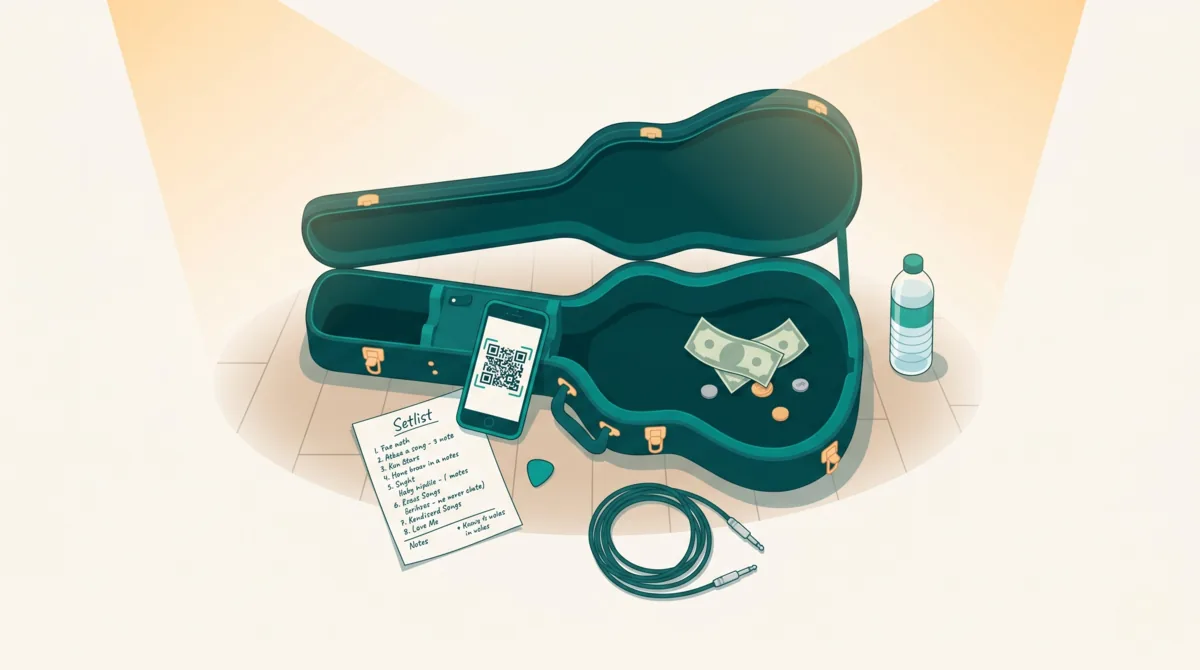



Benefit nights are one of the best things about live music. A band plays, a crowd tips, and at the end of the night some of that money goes to a cause that matters. But collecting donations at a physical event has always been messy — cash jars, Venmo requests shouted from stage, awkward envelopes. Tiplor's fundraiser tools let you run the whole thing digitally, with a live progress bar, automatic tip splitting, and a full report at the end. No spreadsheets, no guesswork.
Quick version
Tiplor lets artists and venues create fundraiser campaigns attached to any gig. You name a beneficiary, set a goal amount, and choose what percentage of tips go to the cause. Fans see a branded fundraiser card and live progress bar on the tip page. When the event ends, you get a full report showing total raised, fees, and exactly what's owed to the cause — with built-in payout tracking.
Why Fundraise at a Gig?
People are already in a generous mood at live events. They're out, they're having a good time, and they're spending money. Adding a cause to the mix doesn't take away from the artist — it adds purpose to the night. Fans feel good about tipping because they know part of it is going somewhere meaningful.
For venues, charity nights are a proven way to drive attendance. They give you a reason to promote the event, attract people who care about the cause, and build the venue's reputation in the community. For artists, it's a way to align your music with something you believe in — and your audience notices.
"We ran a benefit night for the local food bank. The crowd was bigger than a normal Tuesday, and tips were up across the board. People tip more when they know it's going to something good."
How It Works (The Big Picture)
Whether you're an artist or a venue, the flow is the same:
- Create a campaign — Give it a name, optionally name a beneficiary (like "Toronto Food Bank" or "Staff Holiday Fund"), write a short description, and set a goal amount if you have one.
- Set the allocation — Decide what percentage of tips go toward the fundraiser. Venues use a slider (0–100%) to control the split. Artists can dedicate their entire campaign to the cause.
- Go live — Once the campaign is active, fans see a fundraiser card on the tip page with the cause name, description, and a progress bar tracking toward the goal in real time.
- Track and pay out — After the event, check the campaign report for a full breakdown: total raised, platform fees, net amount, and exactly what's owed to the cause. Record the payout right in Tiplor.
Both artists and venues can create fundraisers independently. If you're a venue running a charity night with multiple acts, you set it up once and it applies to all tips that come through during the event.
Why Local Trust Is the Whole Model
Before the tactical setup, here's the part of the system most people miss when they hear "fundraiser on Tiplor": Tiplor doesn't pay the cause directly.
That sounds like a problem. It isn't. It's a deliberate design choice that's worth understanding before you set anything up.
When a fan tips during a fundraiser, the money flows through Stripe into the artist's or venue's normal account, exactly the same way a regular tip does. Tiplor's reports keep track of how much of the total is owed to the cause according to the slider you set. When the fundraiser ends — or whenever you want to settle — you cut a cheque, do an e-transfer, drop off cash, or hand over an envelope. You record the settlement back into Tiplor, and the campaign closes out.
This is the trusted-middleman model. The artist or venue is the human attached to the cause. They handle the money, they remit the funds, they answer for the outcome. Tiplor provides the plumbing and the receipts; the relationship between the artist or venue and the cause is theirs to manage.
A few things this enables:
- Local causes don't need to be registered charities. Most school music programs aren't 501(c)(3)s. Most kids' sports teams aren't on GoFundMe. A neighbourhood family in crisis can't onboard onto a national fundraising platform. They don't need to — the artist or venue handles the remittance.
- No new account creation for the cause. They don't sign up for anything. They don't need a Tiplor profile. They just need a way to receive money from the artist or venue, which is usually already easy (most local causes have a treasurer, an e-transfer email, or a bank account).
- Tiplor stays out of charity-compliance territory. No tax-receipt obligations, no charity verification, no IRS or CRA filings, no donor disclosures. The artist or venue handles their own books; Tiplor stays a tipping rail.
The standard objection goes like this: "If I'm a fan tipping for a cause, how do I know the money actually gets there?" The answer isn't a verified-charity badge. It's the same thing that makes you trust the artist or venue in the first place — you know who they are, you came out to see them, and they're publicly attached to the cause. That reputational stake does more work than any verification system could. It's also why the model works for causes too small or too informal for the bigger platforms.

The chalkboard above is the trust model in one image — a publicly-named cause sitting next to the same tip jar fans were already using. Nothing about the tipping flow changes. The fan still taps. The artist or venue still receives the money. The only thing that changes is who knows where the money is going, and that knowledge is what carries the campaign.
For Venues: Setting Up a Charity Night
Venues have the most control over fundraiser campaigns. Here's the step-by-step:
- Log into your venue dashboard and go to Campaigns
- Tap Create New Campaign
- Fill in the details:
- Fundraiser Title — what fans see (e.g., "Winter Warmth Benefit Night")
- Beneficiary — the cause or organization (e.g., "Downtown Shelter Foundation"). When you name a beneficiary, fans see a pink "Supporting [Name]" badge on the tip page
- Description — a short pitch, up to 200 characters. Make it count — this appears right on the tip screen
- Goal Amount — optional, but recommended. Setting a goal unlocks the progress bar, and there's nothing more motivating than watching it fill up during a live show
- Set the Tip Allocation using the slider. This controls what percentage of the venue's share goes to the fundraiser. At 100%, your entire venue cut goes to the cause. At 50%, half does
- Decide on Include Artist's Share — if you check this box, performing artists also contribute their tip percentage to the fundraiser. Only enable this if you've spoken to your artists first
- Set start and end dates, then publish
Auto-complete option
If you set a goal, you can enable auto-complete — the fundraiser automatically wraps up 24 hours after the goal is reached. Tipping can still continue past the goal (fans see an encouraging message), but the campaign won't run indefinitely.
For Artists: Running Your Own Campaign
You don't need a venue to run a fundraiser. Any artist on Tiplor can create a campaign from their dashboard.
- Go to your artist dashboard and create a new campaign
- Give it a name and optionally fill in venue, date, and location details
- Choose your mode — this controls the tip amount presets fans see (there are options for live musicians, DJs, comedians, spoken word, and more)
- Add an optional headline that appears on your tip page during the campaign
- Activate it, and tips start flowing to the campaign
Artist campaigns are great for solo fundraising efforts: busking for a cause, running a tip drive on social media, or dedicating a specific gig to a charity you care about. Share the campaign link directly — it lives at tiplor.com/@yourhandle/campaign/[id].
What Fans See on the Tip Page
When a fundraiser is active, the tip page looks different. Above the normal tip buttons, fans see a fundraiser card that includes:
- A badge — either a pink "Supporting [Beneficiary Name]" tag if there's a named cause, or a teal "Fundraiser" tag if there isn't
- The campaign name — front and center
- A short description — your 200-character pitch for the cause
- A progress bar — if you set a goal, this fills up in real time as tips come in. It's the single most effective motivator for getting people to tip more
- Running total — shows how much has been raised toward the goal
Jaxon Strings Music
Live Violin & Loops 🎻
Supporting
Toronto Food Bank
Helping feed families across Toronto this holiday season.
Love It Live
Your tip supports Toronto Food Bank
If the fundraiser hits its goal during the event, a celebration badge appears and fans see a message encouraging them to keep going. The energy in the room changes when people see that progress bar tick over — it's genuinely exciting.
How the Tip Splits Actually Work
This is the part people usually have questions about, so here's a clear example.
Say a venue runs a charity night with the allocation slider set to 50%, and Include Artist's Share is off. A fan tips $10:
$10 tip example (50% allocation, artist share excluded):
Artist receives: $8.00 (their normal 80% split, unchanged)
Venue receives: $1.00 (half of their normal $2.00 share)
Fundraiser receives: $1.00 (the other half of the venue's share)
Platform fee (15%) is applied before allocation
At 100% allocation with artist share excluded, the venue's entire cut goes to the cause while the artist keeps their normal split. If you also include the artist's share, then both the venue and artist portions go toward the fundraiser — that's for events where everyone agrees to donate their earnings for the night.
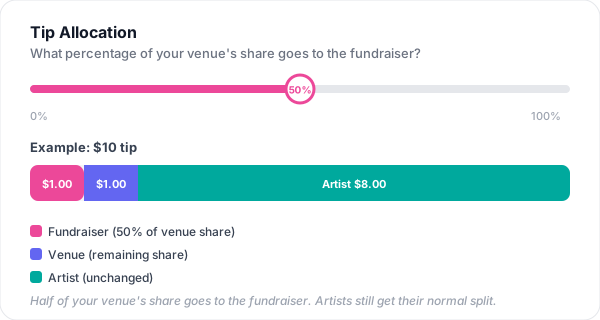
The allocation slider shows a live preview while you're setting it up, so you can see exactly how a sample tip would be divided before you commit.
What this looks like at scale. The single-tip example above is the mechanic. Across a real night, the totals add up fast. Here's what an artist-led campaign at 50% allocation looks like across $500 of tips for a single show:
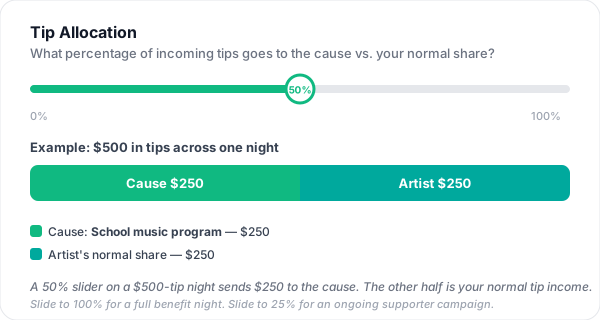
That's $250 going to the school music program from a single Saturday — without anyone tipping more than they normally would, and without the artist losing access to their full share next week. Same plumbing. Different label. Real money showing up where it matters.
After the Event: Tracking and Payout
When the fundraiser ends (or you manually complete it), the campaign report gives you everything you need:
- Total raised (gross) — the full amount tipped toward the campaign
- Platform fees — the 15% processing fee, clearly broken out
- Net amount — what's left after fees
- Amount owed to cause — the exact figure to pay the beneficiary
- Total tip count and average tip — useful for planning next time
- Breakdown by gig/artist — see which acts drove the most tips
- Recent tips list — the last 20 individual tips with amounts and timestamps
When you're ready to pay the beneficiary, record the payout directly in the report: choose a method (e-transfer, cash, cheque, or other), enter the amount, and add any notes. This keeps your records clean and everything in one place — no scrambling through bank statements weeks later.
The Cause Travels With Your Tiplor URL
The fundraiser doesn't have to start and end on gig night. Once it's attached to your Tiplor URL, the same URL works everywhere.
The QR code on the merch table catches the fans in the room. The link in your Instagram or TikTok bio catches the fans scrolling at home. The link at the bottom of your weekly email newsletter catches the fans who never made it to the show but still want to support the cause. The link on a poster at the venue, on a Spotify Canvas, in a YouTube description, in a Linktree — same fundraiser, same cause badge, same progress bar, every surface.
This means a "charity gig" can be a charity month if you want it to be. Set the campaign up at the start of the month, attach the cause, and let it run continuously across:
- Every social bio you've already pointed at your Tiplor page
- Every poster, table tent, and stage-front QR card you'd already use for tipping
- Every email newsletter signature
- Any gig you happen to play during the window — the campaign is still active when you walk on stage
Fans who can't make the show can still contribute. Fans who weren't going to come out can still hear about the cause. Fans who already saw your last show but feel like they want to do something more this time can find the link in three taps. The cause moves with the audience you already have.
Used properly, what shows up on the other side is found money — fans who would have walked out without tipping (no cash, didn't know it was an option) now have a 10-second path. From your end, that's revenue you wouldn't have seen otherwise. From their end, it's a small share of ownership in something they enjoyed and a cause they believe in. Both wins are real, and they're the same transaction.
What This Doesn't Do (Honest Limits)
A few things to be clear about before you set one up:
- No tax receipts to fans. Tiplor doesn't issue charitable-donation receipts on behalf of the cause. If a fan needs a receipt for tax purposes, they should donate to the cause directly through whatever official channel the cause uses. Tipping through Tiplor isn't structured as a tax-deductible donation.
- No charity verification badge. The beneficiary field is a free-text label. Tiplor doesn't verify that the named cause exists or that the funds get remitted. The accountability is between the artist or venue and the cause they named.
- No automatic payout to the cause. Funds flow to the artist's or venue's Stripe account exactly like normal tips. Settlement to the cause is manual — e-transfer, cheque, cash, however the cause prefers to receive money.
- One active campaign per artist at a time. If you switch from "fundraiser for the school music program" to "fundraiser for the hockey team" mid-month, the first one ends. You can't run two simultaneously through the same artist account today.
- No pre-built integrations with named charities. The system doesn't know that "Red Cross" is the Red Cross. It treats every beneficiary the same — a label on a campaign.
If any of those are dealbreakers for the cause you're working with, Tiplor isn't the right tool for that specific configuration — a registered fundraising platform might be a better fit. For local causes, family fundraisers, school programs, sports teams, and informal community efforts, the trust-and-settlement model is usually exactly what fits.
Fundraiser Ideas to Get You Started
- Food bank benefit night — Partner with a local food bank around the holidays. Set a tangible goal (like $500) and promote it on social media in the weeks leading up. The progress bar does the rest.
- Staff appreciation fund — Venues can run a "Staff Holiday Fund" campaign where tips go toward a bonus pool for bartenders, sound techs, and door staff. No beneficiary name needed — just a description explaining where the money goes.
- Medical fundraiser — If a musician in your community is dealing with a health issue, organize a benefit gig. Artists can create the campaign themselves and share the link across their social media.
- Community cause night — Pick a local cause — animal shelter, youth music program, community garden — and make it a monthly event. Regularity builds momentum and audience trust.
- Disaster relief — When something happens and people want to help, a benefit gig can be organized quickly. Create the campaign, set a goal, and share it. The digital format means people who can't attend can still contribute remotely through the link.
Frequently Asked Questions
Can artists and venues both create fundraisers?
Yes. Artists create them from their dashboard. Venues create them with additional controls over tip allocation and artist share. Both types show a fundraiser card and progress bar on the tip page.
How does the tip split work during a fundraiser?
Venues set an allocation percentage (0–100%, in 10% increments) that controls how much of the venue's share goes to the fundraiser. Artists keep their normal split unless the venue explicitly opts to include artist share — which requires communication with the artists first.
Do fans know they're tipping toward a cause?
Absolutely. The fundraiser card appears prominently on the tip page with the cause name, a description, and a live progress bar. It's impossible to miss.
What happens when the goal is reached?
A celebration badge appears on the tip page. If auto-complete is enabled, the fundraiser wraps up 24 hours later. Tips can continue past the goal — fans see a message encouraging extra contributions. You can also end it manually at any time.
How do I pay the beneficiary?
The campaign report shows the exact amount owed. Record your payout method (e-transfer, cash, cheque) and amount directly in Tiplor so everything is tracked in one place.
What currencies are supported?
Tiplor supports USD, EUR, GBP, CAD, AUD, JPY, INR, CNY, BRL, and MXN. Choose the currency when you create the campaign.
Running a fundraiser through Tiplor takes about five minutes to set up and gives you tools that used to require a separate donation platform, a spreadsheet, and a lot of trust. The money is tracked, the splits are automatic, and the fans can see exactly where their tips are going. Pick a cause, pick a date, and make your next gig mean something extra.